
Sit Better. Work Longer. Hurt Less.
Discover the 8 ergonomic office chair features that protect your back, relax your shoulders, and keep you focused through a long working day.
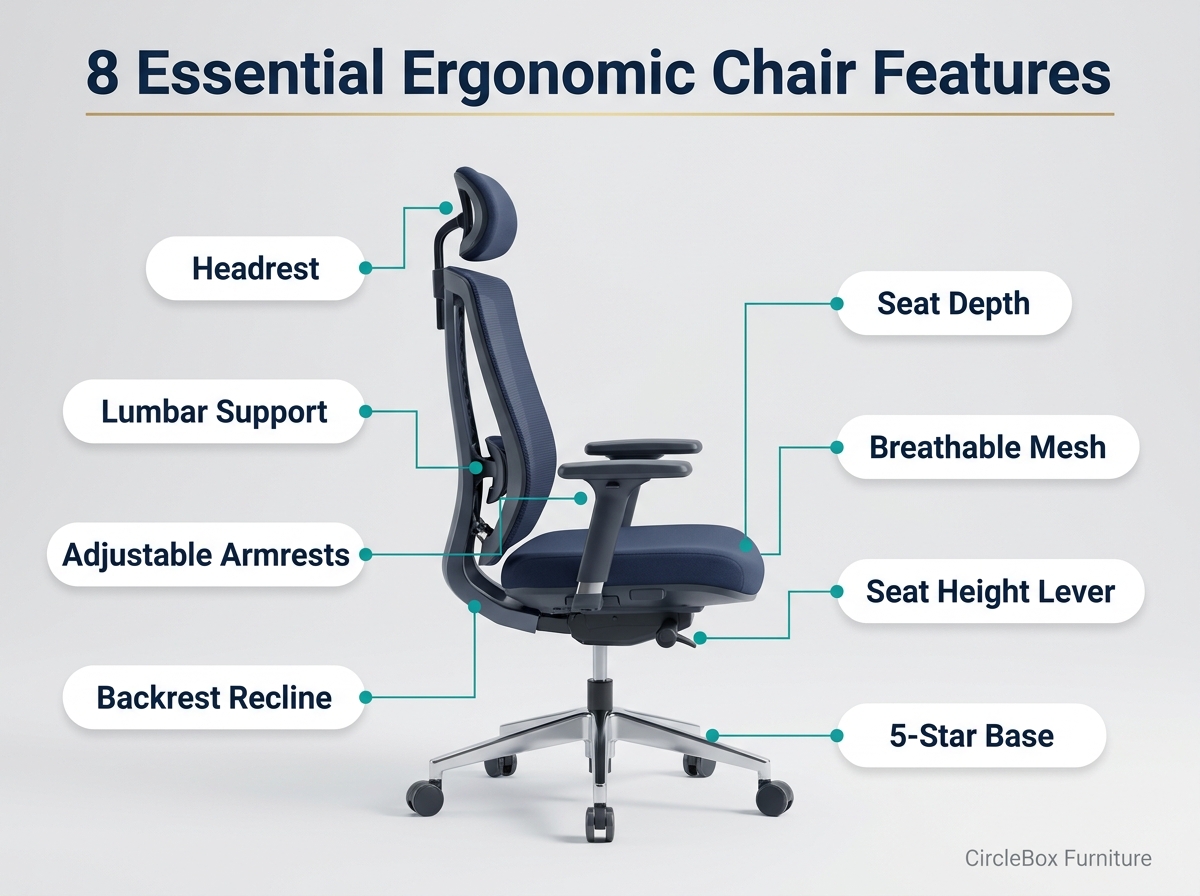
If you sit for six to eight hours a day, your chair is not furniture. It is the most-used tool in your workday. The right ergonomic office chair features keep your spine supported, your shoulders relaxed, and your energy steady, while the wrong ones quietly add back pain, stiff necks, and afternoon fatigue. Whether you are choosing from our CircleBox Furniture ergonomic chairs or comparing other brands, this guide shows exactly what to look for.
⚡ Quick Answer: The 8 Essential Features
- Adjustable seat height so your feet rest flat
- Lumbar support that fills your lower-back curve
- Adjustable seat depth for knee clearance
- Backrest recline and tilt that moves with you
- Adjustable armrests for relaxed shoulders
- Headrest or neck support for reclined moments
- Breathable, supportive material
- Stable five-star base with smooth casters
Adjustable Seat Height
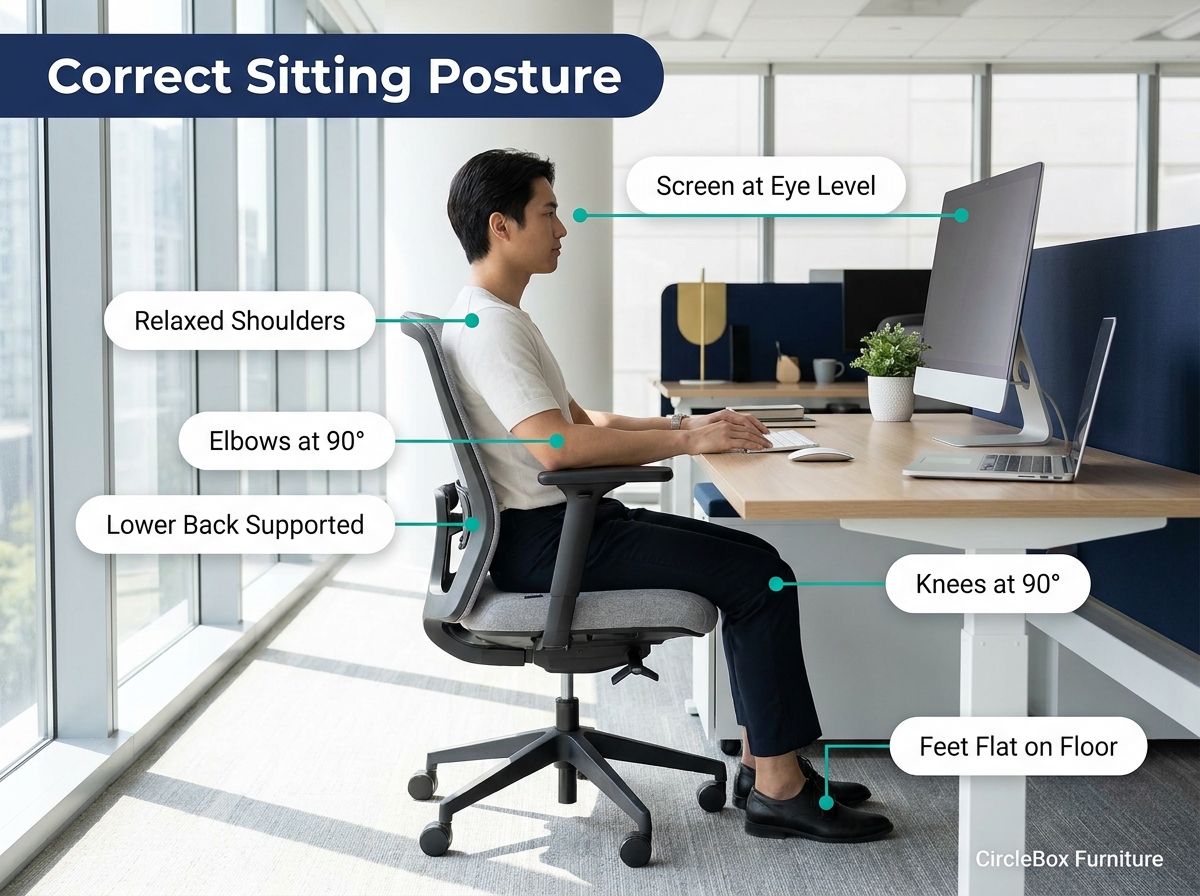
Seat height is the foundation of good posture. When your chair is too high, your feet dangle and pressure builds under your thighs. When it is too low, your knees rise above your hips and your lower back rounds.
A good ergonomic chair uses a gas-lift (pneumatic) cylinder with a smooth lever, so you can fine-tune the height in seconds. OSHA's computer workstation guidance also lists feet resting flat on the floor, or on a stable footrest, as a key checkpoint for a healthy seated posture.
Lumbar Support
Your lower spine has a natural inward curve. Without support, you slouch after a while, the curve flattens, and the muscles around it work overtime. That is why back pain is among the most common complaints of desk workers, and why the Mayo Clinic's office ergonomics guide covers chair setup in detail.
Look for lumbar support that is adjustable in height (and ideally in depth), so it meets your spine instead of a generic one. A fixed bulge that sits in the wrong place can be worse than none at all. You can compare the lumbar support on CircleBox ergonomic chairs before you decide.
Adjustable Seat Depth
Seat depth is the distance from the backrest to the front edge of the seat, and it is often overlooked. If the seat is too deep, the edge presses behind your knees and you end up perching forward, away from the backrest. If it is too shallow, your thighs lack support. The Canadian Centre for Occupational Health and Safety explains this in its guide to adjusting an office chair.
Fit matters locally too. A research paper on office chair design for Bangladeshi body measurements shows why dimensions built for other populations do not always suit everyone, which is exactly why a sliding seat is so valuable.
Backrest Recline & Synchro-Tilt
Your body is not meant to hold one position for eight hours. A chair that lets the backrest recline, ideally with a synchro-tilt mechanism where the seat and back move together in proportion, keeps you supported while you shift, stretch, and think.
Look for a tension knob so the resistance matches your body weight, plus a tilt lock so you can hold your preferred angle. Slightly reclined positions are commonly recommended over a rigid upright 90° because they take load off the spine.
Adjustable Armrests
Armrests do more than give your elbows somewhere to rest. They carry some of the weight of your arms, which reduces strain on your neck and shoulders, especially during long typing and mouse sessions.
Fixed armrests are the most common mistake. They are often too high (shrugged shoulders) or too low (leaning sideways). Choose armrests that adjust at least in height. 3D or 4D armrests that also move in width, depth, and angle are even better. OSHA's workstation checklist says armrests should support both forearms without getting in the way of movement.
Headrest & Neck Support
A headrest will not fix poor posture on its own, but it matters a lot when you recline to read, think, or take a call. It lets the muscles in your neck and upper shoulders switch off for a moment instead of holding your head up.
The best headrests adjust in both height and angle, so they cradle the base of your skull rather than pushing your head forward. If you often work leaning back, treat this as an essential feature, not a luxury.
Want these features without the guesswork?
Explore the CircleBox Furniture ergonomic chair collection, designed for long working days in Bangladesh.
Breathable, Supportive Seat & Back Material
Comfort over a full workday depends on two things: support and breathability. Mesh backs let air circulate, which makes a real difference in warm, humid climates like Dhaka's. Dense, well-shaped foam seats hold their form for years, while cheap foam flattens within months.
Press on the seat. It should feel firm but cushioned, never mushy. Pay attention to the seat edge too: a gently rounded "waterfall" front reduces pressure on your thighs. Not sure which suits you? Browse CircleBox mesh and cushioned chair options and compare them side by side.
Stable Five-Star Base & Smooth Casters
The base is the part you never look at, until it fails. A five-star base is the standard for stability, and a sturdy material (reinforced nylon or metal) keeps the chair safe and durable. Check the chair's rated weight capacity and the quality of the gas lift, and ask about the warranty and after-sales support before you buy.
Smooth casters let you move around your desk without twisting your spine. If you have hard floors, choose soft polyurethane wheels so you do not scratch the surface.
Ergonomic Chair vs. Regular Chair
| Feature | Regular Chair | Ergonomic Chair ✓ |
|---|---|---|
| Seat height | Fixed or basic | Smooth, fully adjustable |
| Lumbar support | Flat or none | Adjustable, fits your spine |
| Armrests | Fixed or missing | Height and angle adjustable |
| Recline | Rigid or simple rocking | Synchro-tilt with tension control |
| Best for | Short-term sitting | Full workdays |
✅ Before You Buy: Quick Checklist
- Does the seat height range suit my height and desk?
- Can I adjust the lumbar support, seat depth, and armrests?
- Does the backrest recline smoothly with tension control?
- Is the material breathable enough for my climate?
- Is there a five-star base, quality gas lift, and weight rating?
- Is there a warranty I can rely on?
Frequently Asked Questions
What is the most important feature of an ergonomic office chair?
Adjustable lumbar support and seat height matter most, because they directly control how your spine and legs are positioned. But no single feature works alone. The best results come from several adjustments working together.
Is a mesh or foam ergonomic chair better?
Neither is automatically better. Mesh breathes well and suits warm climates, while high-density foam offers a softer, more cushioned feel. Choose based on your climate and personal comfort.
Do I really need a headrest?
If you often lean back to think, read, or take calls, yes. A headrest lets your neck muscles relax. If you work mostly upright, it is less critical, though still helpful.
How long should I sit in an ergonomic chair at a stretch?
Even the best chair is not a replacement for movement. Stand up, stretch, or walk briefly every 30 to 60 minutes.
How do I know if a chair fits my body?
Check three things: feet flat on the floor, 2 to 4 fingers of space behind your knees, and your lower back resting against the lumbar support. If all three are true, the fit is good.
Trusted Sources & Further Reading
Final Thoughts
The best ergonomic office chair is the one you can adjust to fit your body: seat height, lumbar support, seat depth, recline, armrests, headrest, breathable material, and a stable base. Get these eight right, and you will sit better, focus longer, and finish your day with less strain.
Explore CircleBox Ergonomic Chairs →